
MCP integration
Integrate Vigilare with AI assistants using the Model Context Protocol (MCP). Control your tasks programmatically.
Vigilare includes a built-in Model Context Protocol (MCP) server with 16 tools, allowing AI assistants like Claude to interact directly with your tasks.
What is MCP?
The Model Context Protocol (MCP) is a standard that enables AI models to connect to external tools and data sources. By enabling Vigilare’s MCP server, you allow AI assistants to:
- Read your tasks, lists, and completion stats
- Create new tasks and lists
- Update task details and status
- Add, edit, and delete comments
- Manage lists (create, archive, unarchive)
This lets you automate your task management or use AI for planning and review.
How it works
Vigilare’s MCP server runs as two cooperating processes:
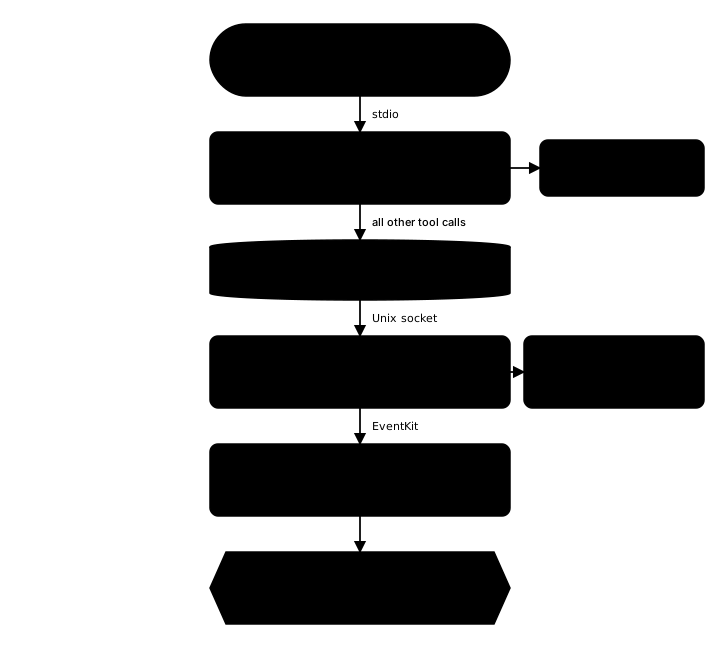
- Forwarder (
vigilare --mcp) — your AI agent launches this process and talks to it over stdio. It answersvigilare_pingandvigilare_get_settingslocally, and relays every other tool call through a Unix socket at~/.vigilare-mcp.sock. - Background Service (
vigilare --daemon) — a LaunchAgent that holds access to Apple Reminders through EventKit and actually performs the work. Splitting it out keeps the Reminders permission stable across agent restarts.
Because the EventKit-backed tools run in the daemon, the Background Service must be enabled — otherwise those tools return a backgroundServiceRequired error.
Setup
1. Enable the background service (required)
Open Settings → MCP and turn on Enable background service.
Without it, every tool that touches Apple Reminders fails with backgroundServiceRequired; only vigilare_ping and vigilare_get_settings respond. The Service status row below the toggle lets you confirm the daemon is reachable.
2. Register with your AI agent
Settings → MCP shows a ready-to-copy command for each supported agent. Run one in your terminal:
Claude Code
claude mcp add "vigilare" --scope user -- "/Applications/Vigilare.app/Contents/MacOS/Vigilare" --mcpCodex CLI
codex mcp add vigilare -- "/Applications/Vigilare.app/Contents/MacOS/Vigilare" --mcpNote — if you installed Vigilare somewhere other than
/Applications, use the exact executable path shown in Settings → MCP.
For Claude Desktop, or any client that reads an .mcp.json-style config, add the following instead (also available under Manual configuration (JSON) in Settings):
{
  "mcpServers": {
    "vigilare": {
      "command": "/Applications/Vigilare.app/Contents/MacOS/Vigilare",
      "args": ["--mcp"]
    }
  }
}
3. Restart your AI agent
Restart Claude (Desktop or CLI) or Codex to load the new tool definitions.
Output format (optional)
Settings → MCP → Use TOON output format switches tool responses to TOON — a compact, token-efficient format for AI agents. The change takes effect after the background service restarts.
Available tools
Vigilare provides 16 tools for task management.
| Tool | Description | Key parameters |
|---|---|---|
vigilare_get_lists |
Get all task lists and their incomplete task counts. | include_archived |
vigilare_get_reminders |
Fetch tasks by filter, scoped to one or several lists, optionally matched by due or completion date. | filter (today/overdue/recurring/noDueDate/all), list_id, list_ids, from, to, include_completed, date_field (due/completed) |
vigilare_get_stats |
Get aggregate completion stats (totals only) — completed, dropped, and incomplete counts by list, plus 7-day and 30-day trends. Defaults to the trailing 7 days. | from, to |
vigilare_get_reminder |
Get full details of a specific task, including notes and comments. | — |
vigilare_search_reminders |
Search tasks by keyword in title, list name, or notes. | — |
vigilare_create_reminder |
Create a new task with title, notes, due date, priority, list, and optional recurrence rule. | title, notes, due date, priority, list, recurrence |
vigilare_update_reminder |
Update specific fields of a task. Use "none" for due_date to clear it. |
title, notes, due_date, priority, list, recurrence |
vigilare_set_reminder_status |
Change task status. | complete, reopen, drop (abandon; treated as completed), wait (put on hold; stays incomplete) |
vigilare_add_comment |
Add a text comment to a task’s history. | — |
vigilare_update_comment |
Edit the content of an existing comment. | — |
vigilare_delete_comment |
Delete a comment from a task. | — |
vigilare_create_list |
Create a new list. | — |
vigilare_archive_list |
Hide a list from the main view. | — |
vigilare_unarchive_list |
Restore an archived list. | — |
vigilare_ping |
Check if the server is running. | — |
vigilare_get_settings |
Check current app configuration. | — |
Usage examples
Daily review — Ask Claude: “Summarize what I completed yesterday and what’s overdue today.”
Weekly report — Ask Claude: “Use the stats for the last 7 days and tell me which list I made the most progress on.”
Quick capture — Ask Claude: “Add a high priority task to ‘Work’ list: ‘Prepare Q3 Report’ due next Friday.”
Project planning — Ask Claude: “Create a list ‘Project X’ and add tasks for the initial phase.”
Troubleshooting
Tools return a backgroundServiceRequired error
- Open Settings → MCP and turn on Enable background service
- Check the Service status row below the toggle to confirm the daemon is reachable
- Only
vigilare_pingandvigilare_get_settingswork until the service is running
Your AI agent does not list Vigilare’s tools
- Confirm the executable path in the command matches where Vigilare is installed (see Settings → MCP)
- Re-run the
claude mcp addorcodex mcp addcommand, or re-add the JSON config - Restart Claude (Desktop or CLI) or Codex so it reloads tool definitions
No tasks come back
- Confirm Apple Reminders access is granted so EventKit can read your tasks
- Check the
filter,list_id, and date range you asked for actually match existing tasks - For weekly or monthly reviews, use
vigilare_get_statsinstead of a widevigilare_get_remindersrange